今日升级了一下Axure Cloud for Business On-Premises准备尝尝鲜,原本以为升级没啥问题,升级后发现原有项目无法在线预览了。经过控制台排查,发现前端获取项目页面路径会报错404。但是部分项目又没问题,让人一头雾水。后来有个demo项目包括中文页面和英文页面,才发现中文界面会报404,而英文界面没问题。
本着程序员的直觉,这个应该是一个路径编码BUG,遂到官方论坛反馈,但是看官方论坛的回复积极度一时半会儿估计也没法又解决方案。幸好现在是AI时代,在AI的加持下终于找到了问题所在。
1.先找到日志路径:C:\ProgramData\Axure\Share\logs\error
2.找到关键日志:
2026-05-09 06:00:50.6802Z
hostname: WIN-SERVER-2016
method: GET
path: https://axure.cloud.xxxx.net/SHQJ7N/%E5%85%A8%E7%97%85%E7%A8%8B%E7%AE%A1%E7%90%86%E6%9C%8D%E5%8A%A1%E5%B9%B3%E5%8F%B0.html
userAgent: Mozilla/5.0 (Windows NT 10.0; Win64; x64) AppleWebKit/537.36 (KHTML, like Gecko) Chrome/145.0.0.0 Safari/537.36 Edg/145.0.0.0
controller: Prototype
action: Show
message: Could not find file ‘C:\ProgramData\AxureShare\data\content\dc\a6\ff\dca6ffae12c6483082b8aa551d8ed6e9\%e5%85%a8%e7%97%85%e7%a8%8b%e7%ae%a1%e7%90%86%e6%9c%8d%e5%8a%a1%e5%b9%b3%e5%8f%b0.html.processed’.
exception: System.IO.FileNotFoundException: Could not find file ‘C:\ProgramData\AxureShare\data\content\dc\a6\ff\dca6ffae12c6483082b8aa551d8ed6e9\%e5%85%a8%e7%97%85%e7%a8%8b%e7%ae%a1%e7%90%86%e6%9c%8d%e5%8a%a1%e5%b9%b3%e5%8f%b0.html.processed’.
File name: ‘C:\ProgramData\AxureShare\data\content\dc\a6\ff\dca6ffae12c6483082b8aa551d8ed6e9\%e5%85%a8%e7%97%85%e7%a8%8b%e7%ae%a1%e7%90%86%e6%9c%8d%e5%8a%a1%e5%b9%b3%e5%8f%b0.html.processed’
at Microsoft.Win32.SafeHandles.SafeFileHandle.CreateFile(String fullPath, FileMode mode, FileAccess access, FileShare share, FileOptions options)
at Microsoft.Win32.SafeHandles.SafeFileHandle.Open(String fullPath, FileMode mode, FileAccess access, FileShare share, FileOptions options, Int64 preallocationSize, Nullable1 unixCreateMode) at System.IO.Strategies.OSFileStreamStrategy..ctor(String path, FileMode mode, FileAccess access, FileShare share, FileOptions options, Int64 preallocationSize, Nullable1 unixCreateMode)
at AxShare.Config.FileStorage.GetFileStringAsync(String fullPath) in D:\a\1\s\Config\FileAsyncStorage.cs:line 306
at axshare_mvc.Controllers.PrototypeController.DownloadFileContent(String bucket, String key, Prototype prototype, Nullable`1 decompress, String resourceDirVersion) in D:\a\1\s\axshare_mvc\Controllers\PrototypeController.cs:line 5066
at axshare_mvc.Controllers.PrototypeController.GetS3ContentBucketContentAsync(String s3Key, ShortcutKey shortcutKey, Prototype prototypeToShow) in D:\a\1\s\axshare_mvc\Controllers\PrototypeController.cs:line 3424
at axshare_mvc.Controllers.PrototypeController.GetContentFromS3Async(String path, ShortcutKey shortcutKey, Prototype prototypeToShow, CachedPpiBag ppiBag, GenerationManifest manifest) in D:\a\1\s\axshare_mvc\Controllers\PrototypeController.cs:line 3016
at axshare_mvc.Controllers.PrototypeController.Show(String shortcut, String path, String invalidPathFor404, ShortcutKey shortcutKey, Boolean isCustomPrototypeLogin) in D:\a\1\s\axshare_mvc\Controllers\PrototypeController.cs:line 2472
3.通过dnspy查看一下AxShare.Config.FileStorage.GetFileStringAsync代码
private async Task<string> GetFileStringAsync(string fullPath)
{
string @string;
using (FileStream sourceStream = new FileStream(fullPath, FileMode.Open, FileAccess.Read, FileShare.Read, 4096, true))
{
byte[] buffer = new byte[sourceStream.Length];
int numBytes = await sourceStream.ReadAsync(buffer, 0, buffer.Length);
@string = Encoding.UTF8.GetString(buffer, 0, numBytes);
buffer = null;
}
FileStream sourceStream = null;
return @string;
}
问了一下AI,AI的解答:
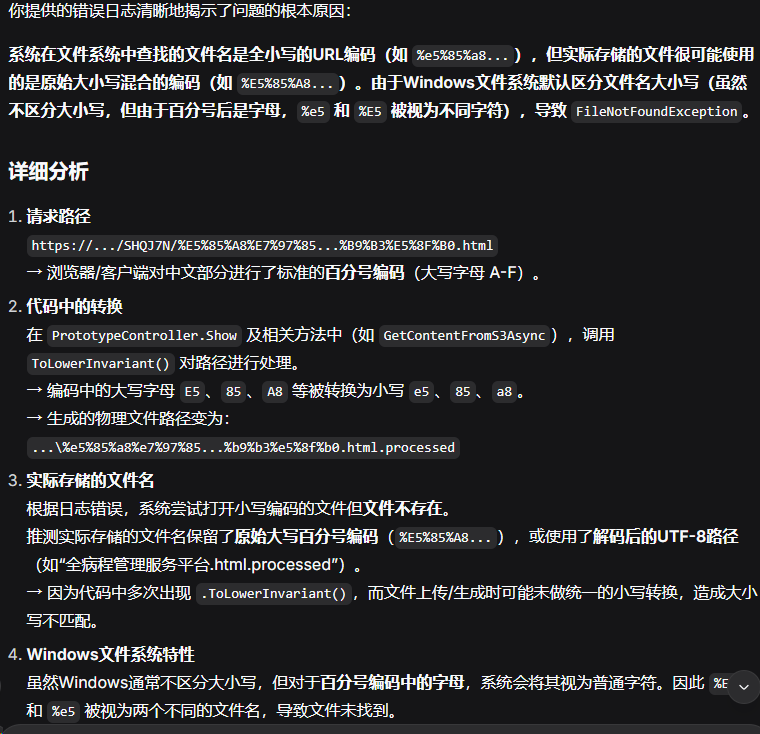
4.我尝试的解决方案:
private async Task<string> GetFileStringAsync(string fullPath)
{
fullPath = HttpUtility.UrlDecode(fullPath);
string @string;
using (FileStream sourceStream = new FileStream(fullPath, FileMode.Open, FileAccess.Read, FileShare.Read, 4096, true))
{
byte[] buffer = new byte[sourceStream.Length];
int numBytes = await sourceStream.ReadAsync(buffer, 0, buffer.Length);
@string = Encoding.UTF8.GetString(buffer, 0, numBytes);
buffer = null;
}
FileStream sourceStream = null;
return @string;
}
5.替换服务器文件AxShare.Config.dll后,重新启用服务。

6.验证问题,可以打开。
经验教训:
1.升级之前要备份数据库,否则新版本出问题无法降级。
2.AI可以补足自己的知识盲区。
附件:
中文路径修复补丁: